Invoice Maker - MobileBiz Pro
- 3.6
- Rating
- 10.00K
- Installs
- Free
- Price

 Analysis by App-foxy
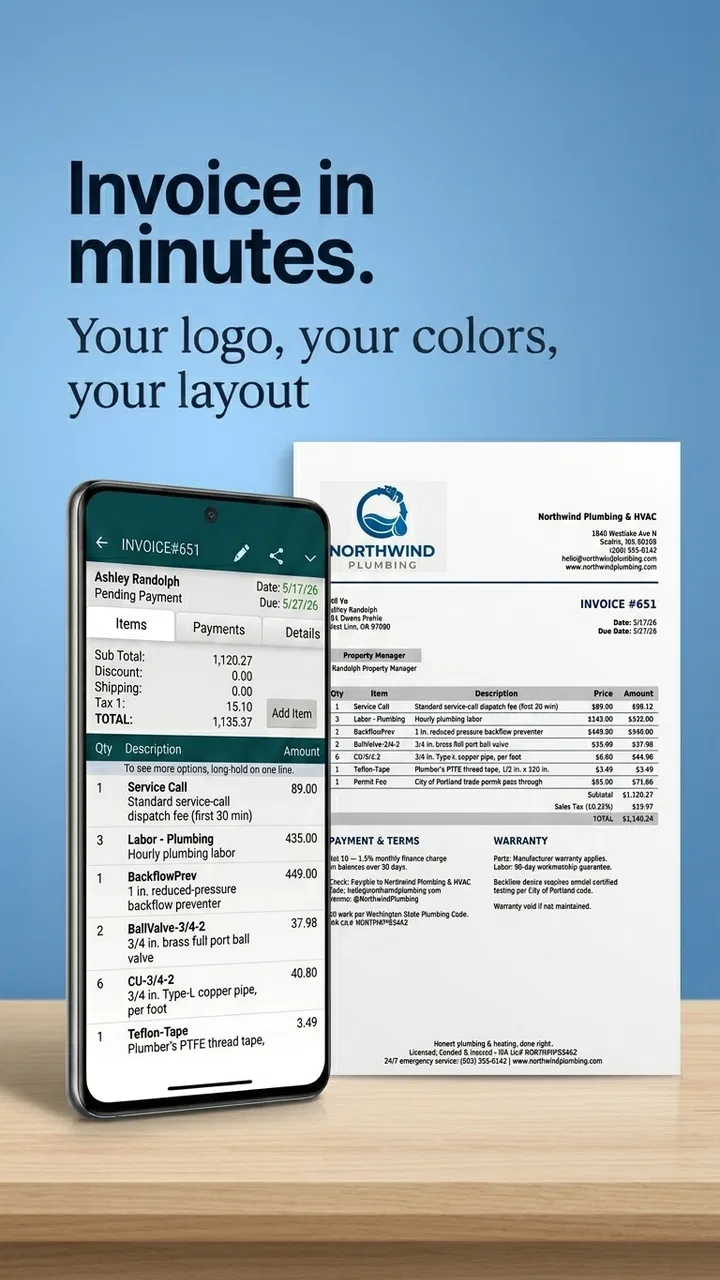
Invoice Maker - MobileBiz Pro is the kind of business app I would consider when I need to create invoices away from a desk, especially if my work sometimes takes me to customers, job sites, markets, or places with unreliable internet. It comes from Mobilebiz Systems and sits in the business category, with a free download and optional in-app purchases ranging from $0.99 to $149.99 per item. The basic idea is practical: prepare invoices, estimates, and sales orders, keep an eye on payments and inventory, and work offline rather than depending on a constant connection.
After spending time with it, my impression is that its value depends less on flashy presentation and more on whether its offline, record-keeping approach matches the way you actually work. It is not the sort of tool I would choose simply because it has the newest interface. I would choose it when having sales documents and business information available on a phone matters more than having a large cloud accounting ecosystem.
Where the first-time experience can become confusing
The biggest source of friction is not the act of making an invoice. It is deciding how to organize the information before making several invoices in a row. A small business owner may already have customer names, product descriptions, prices, tax details, and payment notes stored in different places. Entering those details casually can leave a messy trail that becomes harder to interpret later.
You May Also Like

 AccuWeather: Weather Radar
AccuWeather Review: A Quick, Clear Forecast for Everyday Decisions
For everyday plans, the best forecast is the one you can understand quickly. AccuWeather makes rain timing, radar, and local conditions easy to act on, with a few trade-offs.

 Hill Climb Racing
Why Hill Climb Racing Still Turns Crashes Into One More Run
A tiny car, a bumpy hill and one more upgrade: Hill Climb Racing keeps resurfacing because its simple chaos makes every near-miss feel personal.

 AliExpress - Shopping App
AliExpress Makes Global Shopping Feel Personal, but Shoppers Bear the Risk
AliExpress turns a global marketplace into a pocket-sized discovery engine. Its reach is useful, its shopping loop compelling, and its trade-offs easy to miss.

 Lords Mobile: Kingdom Wars
Lords Mobile Is a Kingdom-Building Routine, Not a Quick Match
A case-by-case verdict on the building, battles, device demands, and social commitments that make Lords Mobile rewarding for some players and exhausting for others.

 PDF Scanner app - TapScanner
TapScanner Makes Paperwork Easier to Capture, Check, and Share
TapScanner makes scanning with a phone feel less like a rescue operation and more like a dependable step in getting work done. Its capture tools are useful, though not flawless.

 Block Blast!
Block Blast! Shows How Much a Puzzle Game Can Leave Out
A quiet grid game shows why puzzle players increasingly value instant clarity, repeatable skill and low-pressure play—and where the genre still needs to catch up.
More From Our News Desk
View All News


I recommend treating the first session as a setup session rather than trying to issue a document immediately. Start with a small, representative customer and one ordinary item. Check how the customer information appears, how the item is described, and whether the resulting document reflects the way you normally talk to clients. This simple test can reveal awkward labels or missing details before they affect a real sale.
Another place users can get stuck is the difference between an estimate, a sales order, and an invoice. These documents may belong to different moments in the same sale, so choosing the first option that looks familiar can make later payment tracking less clear. My practical habit is to decide what event I am recording before opening the form: a possible job, an agreed order, or money that is now owed.
That distinction is especially useful for service work. Suppose I visit a customer to discuss repairing a device. I would begin with an estimate if the final work or cost is still being discussed. Once the customer approves the work, a sales order may better represent the commitment. When the work is complete and payment is due, I would move to an invoice. Thinking in that sequence reduces duplicate records and makes the business history easier to follow.
The app’s average rating is 3.6 from around two thousand ratings, which matches my view that it can be useful but will not feel effortless to everyone. It has been around since November 27, 2010, and that long presence suggests a product built around a specific business workflow rather than a trend-driven interface. The trade-off is that users who expect a polished, modern accounting dashboard may need more patience here.
Checks worth making before relying on it
Before using the app for a busy day, I would confirm that the phone has enough free space, that the operating system meets the minimum requirement of version 8.0, and that the app is updated to its current version, 1.5.6. These are ordinary checks, but they matter when an application is being used as a working record rather than as a casual calculator.
I would also create a test document and inspect it from the customer’s point of view. Look for spelling, business details, item descriptions, totals, and payment wording. A document can be technically saved while still being confusing to the person receiving it. Testing one invoice with a low-risk example is far better than discovering a formatting or data-entry problem after sending several documents.
Inventory deserves its own check. If you sell physical goods, decide whether the quantities in the app will be your main stock record or only a convenient running reference. I would not mix handwritten adjustments, memory, and app entries without a clear routine. When stock changes outside the normal sales process, record the reason immediately if the app’s available workflow allows it, or keep a separate note until the record can be corrected.
This is one of the less obvious decisions with a tool like this: offline access is helpful, but it also means the phone can become the place where information is entered without another system immediately checking it. I would use a short end-of-day review to compare invoices, payments, and inventory changes. That habit is more important than trying to enter everything quickly.
The age rating is Everyone, so the app is not presented as restricted to a mature audience. That does not remove the need for sensible business handling, of course. Anyone using it for a company should still think about who can access the device and whether the phone is an appropriate place for customer and payment records.
A setup routine that prevents avoidable mistakes
My preferred setup routine is deliberately small. I would first add one customer, then one product or service, then create one estimate and one invoice using that same information. After that, I would record a sample payment and inspect the reports. This sequence checks the path from a potential sale to money received, rather than testing each screen in isolation.
For a mobile repair worker, for example, I might create a customer record for a local shop, add a service such as screen replacement, prepare an estimate during the visit, and later turn the approved work into an invoice. If the customer pays immediately, I would record that payment while the details are still fresh. If payment is delayed, I would leave the invoice clearly identifiable and review it during the next bookkeeping session.
I would avoid entering a large catalog until the small test works properly. A long list of items can make it harder to identify whether a problem comes from the app, a typo, or an inconsistent naming choice. Use one naming style for similar products and services. “Installation,” “Install,” and “Setup service” may all mean the same thing to you, but inconsistent labels make reports and searches less useful.
There is also a financial consideration. The app itself is free, but optional purchases are available, including items priced as high as $149.99. I would explore the basic workflow first and only consider a purchase after identifying a real need. A free starting point is valuable, but it should not encourage anyone to assume that every advanced requirement will remain free.
Recovering when a workflow goes wrong
When an invoice appears incorrect, my first step would be to stop creating more documents. Repeating the same action can make the record harder to untangle. I would write down the customer, document type, item, amount, and payment status, then compare that note with what the app currently shows. This gives me a stable reference before I edit anything.
If the issue is a simple typing mistake, correct the source information carefully and then review the document again. If the document represents the wrong stage of a sale, I would avoid casually treating it as an estimate, order, or invoice interchangeably. The safest approach is to preserve a clear explanation in my own business notes and use the app’s available record controls consistently, rather than silently creating a second document that looks like the first.
Offline work changes how I would troubleshoot. If an entry seems missing, I would first check whether I am looking in the correct section and whether the customer or document was saved under a slightly different name. I would also close and reopen the relevant screen before assuming that the record has disappeared. Most importantly, I would not immediately re-enter the same sale, because that can create duplicates and distort payment or inventory information.
A useful recovery habit is to keep a short paper or local note during a busy shift. I would record the customer, the sale, the amount, and whether payment was received. Once I have time to review the app, I can compare each note with the stored records and mark them off. This is not a replacement for the app; it is a temporary safety net when several customers arrive at once or when the phone is being used in distracting conditions.
Reports should be treated as a review tool, not as proof that every entry is correct. A report can summarize what was entered, but it cannot know that an item was typed under the wrong customer or that a cash payment was forgotten. I would use reports to spot unusual gaps, unpaid invoices, or inventory changes, then inspect the individual records behind those results.
One practical trade-off is speed versus control. Entering a complete record at the counter may slow down the customer interaction, while entering only a quick amount may leave important context for later. For my own workflow, I would capture the essential sale immediately, then reserve a quiet time for descriptions, payment status, and stock review. That division keeps the line moving without turning the evening reconciliation into guesswork.
When the app is not actually the cause
Not every failed invoice points to a software problem. A wrong total may come from an outdated price, a duplicated item, or a service description that was reused without checking. A missing payment may simply be a payment that was never recorded. Before blaming the application, I would compare the app entry with the receipt, order note, bank record, or cash count that represents the real-world transaction.
Device conditions can also matter. A nearly full phone, an outdated operating system, a damaged screen, or aggressive battery-saving behavior can make any business app feel unreliable. If only one screen behaves strangely, I would test a small, harmless entry elsewhere rather than making broad changes. If the whole phone is slow or unstable, the more useful fix may be device maintenance rather than replacing the invoice tool.
Human routines are often the hidden problem. If two people share responsibility for sales but use different customer names or payment conventions, the resulting records may look inconsistent even when the app is functioning normally. I would agree on a simple internal rule: how customers are named, when an estimate becomes an invoice, and who confirms payment. A modest app becomes much more dependable when the people using it follow the same process.
I would also be cautious about treating offline capability as automatic protection against every operational risk. It is excellent for working where connectivity is poor, but I would still schedule regular reviews and maintain whatever broader accounting or tax process the business requires. The app can organize invoices, estimates, orders, payments, inventory, and reports, yet it should not be mistaken for professional financial advice or a complete substitute for every business system.
This is where alternatives may be better. If I needed payroll, bank feeds, collaborative access for a larger team, extensive automation, or a full accounting platform, I would look beyond a focused mobile invoice tool. A spreadsheet may be better for a very small operation that only needs a custom list, while a cloud accounting service may suit a growing company that needs multiple users and deeper financial integration. On the other hand, those alternatives can feel excessive for a solo worker who mainly needs to issue documents and review payments while away from a computer.
Who will get the most from it?
I see the strongest fit for independent tradespeople, small retailers, mobile service providers, and owners who need a straightforward way to keep sales records on a phone. Someone who regularly works offline may appreciate the ability to continue preparing business documents without waiting for a connection. The combination of invoices, estimates, sales orders, payment tracking, inventory, and reports gives a small operation more structure than a collection of text messages and handwritten notes.
It can also suit a person who wants to start cautiously. Because the app is free to download, I can test the central workflow before committing money. The important word is test: I would not build the entire business around it until I had completed several realistic cycles from estimate to invoice to payment and checked that the reports match my own records.
I would skip it if my priority were a highly collaborative office system or a polished, full-scale accounting environment. I would also hesitate if I disliked entering information on a phone, because the app’s usefulness depends on consistent data entry. Someone who only sends an occasional invoice may find a simpler document template easier, while someone with complex financial obligations may need a more comprehensive platform.
With more than ten thousand installs, it has found an audience, but that does not make it automatically right for every business. Its appeal is specific: mobile business records with offline usefulness. I would judge it by that job rather than by comparing it with services designed for entirely different levels of accounting complexity.
My practical verdict
My overall view is cautiously positive. MobileBiz Pro is most convincing when I use it as a disciplined field tool: create the right document for the right stage of a sale, record payment promptly, review inventory deliberately, and reconcile the day instead of trusting memory. Those habits turn its focused feature set into something genuinely useful.
The friction is real. Setup requires thought, inconsistent naming can weaken reports, and offline entry makes personal checking important. The interface may not satisfy people looking for a modern, all-in-one financial suite. Optional purchases also mean I would investigate the free workflow before deciding whether any paid capability is worthwhile for my situation.
Still, I would recommend giving it a careful trial to a solo business owner who needs invoices and estimates on the move. Start with one customer and one service, test a complete transaction, inspect the payment and inventory records, and only then expand. The best reason to choose this app is not that it replaces every business system; it is that it can keep a small sales workflow moving when a desk and constant internet are not available.
Developed by Mobilebiz Systems, the app remains a practical option for people who value portability over sophistication. In my experience, it rewards a tidy routine and exposes a messy one. If that matches the way you run your business, the free starting point makes it worth evaluating. If you need deep accounting, teamwork, or automation from the beginning, I would choose a broader alternative instead.
FAQs for Invoice Maker - MobileBiz Pro
01What is Invoice Maker - MobileBiz Pro used for?
Invoice Maker - MobileBiz Pro is designed for freelancers, contractors, small businesses, and mobile professionals who need to create and manage invoices from an Android device. During testing, the app proved useful for preparing estimates, recording customer and product details, tracking payment status, and keeping business documents organized without depending on a desktop accounting program.
02Can I customize invoices and estimates in Invoice Maker - MobileBiz Pro?
Yes, the app provides customization options that help invoices look more professional and match your business identity. You can generally add company information, customer details, line items, taxes, discounts, notes, and payment terms. Depending on the version and device, available templates and branding controls may vary, so it is worth checking the current feature list before downloading.
03Does Invoice Maker - MobileBiz Pro work offline?
One of the practical advantages of MobileBiz Pro is that it is intended for use while working away from the office, including situations where an internet connection may not be available. You can prepare business documents and manage stored information locally, then share or synchronize data when appropriate. However, cloud backup, email delivery, or other connected services may require internet access.
04Can I send invoices to customers directly from the app?
The application supports sharing completed invoices and estimates through common options available on your phone, such as email or other installed communication applications. This makes it convenient to send a document immediately after finishing a job. Before relying on a particular delivery method, verify that your email account, printer, or sharing service is configured correctly on the device.
05Is Invoice Maker - MobileBiz Pro suitable for accounting and tax management?
MobileBiz Pro can help with everyday invoicing, estimates, customer records, payment follow-up, and basic business organization, but it should not automatically be considered a complete accounting or tax platform. Businesses with payroll, advanced bookkeeping, inventory requirements, or complex tax obligations may need separate accounting software. Always review calculations and consult a qualified professional for official tax reporting.
Pros
- Creates professional invoices directly from your Android device.
- Supports estimates
- receipts
- expenses
- and customer records in one app.
- Works offline
- making it useful for mobile work and poor connectivity.
- Offers customizable invoice templates and business branding options.
- Helps track payment status and outstanding balances more easily.
Cons
- Some advanced features may require a paid subscription or upgrade.
- The interface can feel crowded for users who only need simple invoices.
- Accounting and tax integrations may be limited compared with larger platforms.
- Manual data entry can become time-consuming for businesses with many orders.
- Cloud backup and device syncing may depend on the selected plan.

Invoice Maker - MobileBiz Pro
Gallery